Every week I work with new teachers. At the beginning of the year, we worked on classroom management ideas and classroom organization. These are both necessary for new teachers to be able to focus on instruction, but after many years of working with first and second year teachers, it becomes a little routine to me.
Then we move on to something I can really get excited about—using technology in the classroom.

At this point in the year, we are working on projects to integrate technology. Technology has become one of those areas teachers need to implement so that students can become proficient in this tech-rich society. You cannot assume students understand the most obvious rules.
Here are some things I have learned in the last few years about technology in the classroom:
1) Do not assume that students are proficient because they can text and take selfies. Using a chrome book is not difficult, but it is not a cell phone. And most students just do not get that much practice. They need practice logging in, may need help with their password (I always run a copy of my class list with email addresses and passwords so it is handy) and using any links you provide.
2) Find some easy way to having students use links. I post in Google Classroom. If that is not possible, use www.bit.ly.com. Sign up for an account and create custom links. Students do not take typing any more, the do not know the keyboard and have difficulty typing in unfamiliar words and phrases.
Model Everything.
3) Model EVERYTHING. How to take a
4) Make sure you have clear rules about using chromebooks.
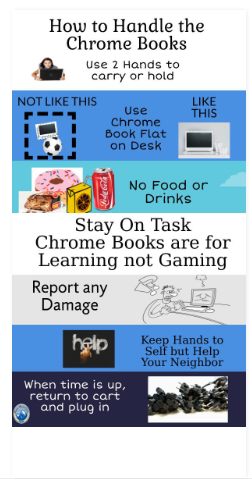
Download graphic if you like. Feel free to print for students or make a poster with it. Then you can just point at it.
5) Students need to show you any damage to the
Use Acccountability Strategies
6) Use some system of keeping track of what students are doing. I use goguardian.com. It shows me their screens and the first time a student wanders off task, they get a warning. The next time, their screen is locked and they are given a worksheet to complete instead of the online activity. If you do not have some online management tool to track their internet activity, walk around and check.
You can also use some accountability strategies. For instance, have students have a recording sheet where they show work, or write down answers to check, have them take a google form quiz at the end with specific questions, do an exit ticket from the online activity. This will keep most students on task.
Use Students as Assistants
6) You will have some students who are really good with everything computers. Make use of these students and appoint them your assistants. Students who cannot sign in will sit and wait, these student assistants can handle that job easily and it frees you up. Student assistants can also be appointed to monitor the chromebook returns.
Once my new teachers had a try at managing chromebook use in the classroom, we starting brainstorming ways to use them. We began with the Google products, posting assignments to Google classroom, completing warm-ups in Google forms and using the announcement feature in Google Classroom to keep students informed. Each teacher is unique and each class has different needs.
Once we tried the basics, we were ready to explore. There are so many online activities available, some free and some are not. One of my favorite paid sources is Quia.com. I have been a user for 10 years now. It was one of the first online resources I used for students (before chrome books I would book the computer lab every Friday) and I saw positive results with using technology. Those first efforts convince me that the right resources make a difference.
Organizational Solutions for Links
One problem that we all have is accumulating all the links and websites and now organizing them. Have you tried Symbaloo.com? Symbaloo is a way of organizing all those websites in one place in Google heaven (Thank you Google) so it is accessible from any computer.

This is my actual Algebra Tab on my Symbaloo. I keep all my financial links on a separate tab. Bookmarks are fine, but if you have ever had to look through a long list of bookmarks to find a specific one, you will appreciate this organizational tool.
Webquests
While this next idea is a very old one, it is still useful today. WEBQUESTS? Have you heard of these? This is an idea that was very popular years ago. But everything old becomes new again, and I recently have used a few of these for my Consumer Math students as we prepare to play the Stock Market Game.
A WebQuest is like an internet search on a specific topic. It has an introduction, has a task, links to explore a certain topic, includes a rubric. They can take one class period or several. You can make your own at Zunal.com or explore one that has already been created. As with any other activity, make sure you do it first before arriving at class and assigning to students.
Here is a challenge for you, the same one I gave my new teachers. Make February the month you try something new in technology. If you are already an expert, reach out to a new teacher and help them as well. After all, February is the month of love and who doesn’t love technology?
Click On The Given Link To Read More Such Posts.
https://getblogour.com/all-the-information-you-need-about-accessibe-glassdoor/